Freelancer & Contractor Management
Verify freelancer work hours, track project progress with proof of work, ensure accurate invoicing, and maintain accountability across your contractor workforce.
The Freelancer Management Challenge
Can You Really Trust Freelancer Time Sheets?
Managing freelancers and contractors introduces unique challenges around accountability, billing accuracy, and work verification.
- Inaccurate Time Reporting
Freelancers submit inflated or inaccurate timesheets. Without verification, you're paying for hours that may not have been worked, or work that wasn't actually completed.
- No Proof of Work
You can't verify what freelancers were actually doing during reported hours. Were they working on your project or juggling multiple clients? No visibility means no accountability.
- Invoice Disputes
Manual timesheets lead to billing disputes, payment delays, and strained relationships. You question hours, freelancers defend their work, and nobody wins.
The Solution
Built for Freelancer Accountability
WorkComposer provides transparent time tracking with proof of work, eliminating invoice disputes and building trust between you and your contractors.
- Automatic Time Tracking with Proof of Work
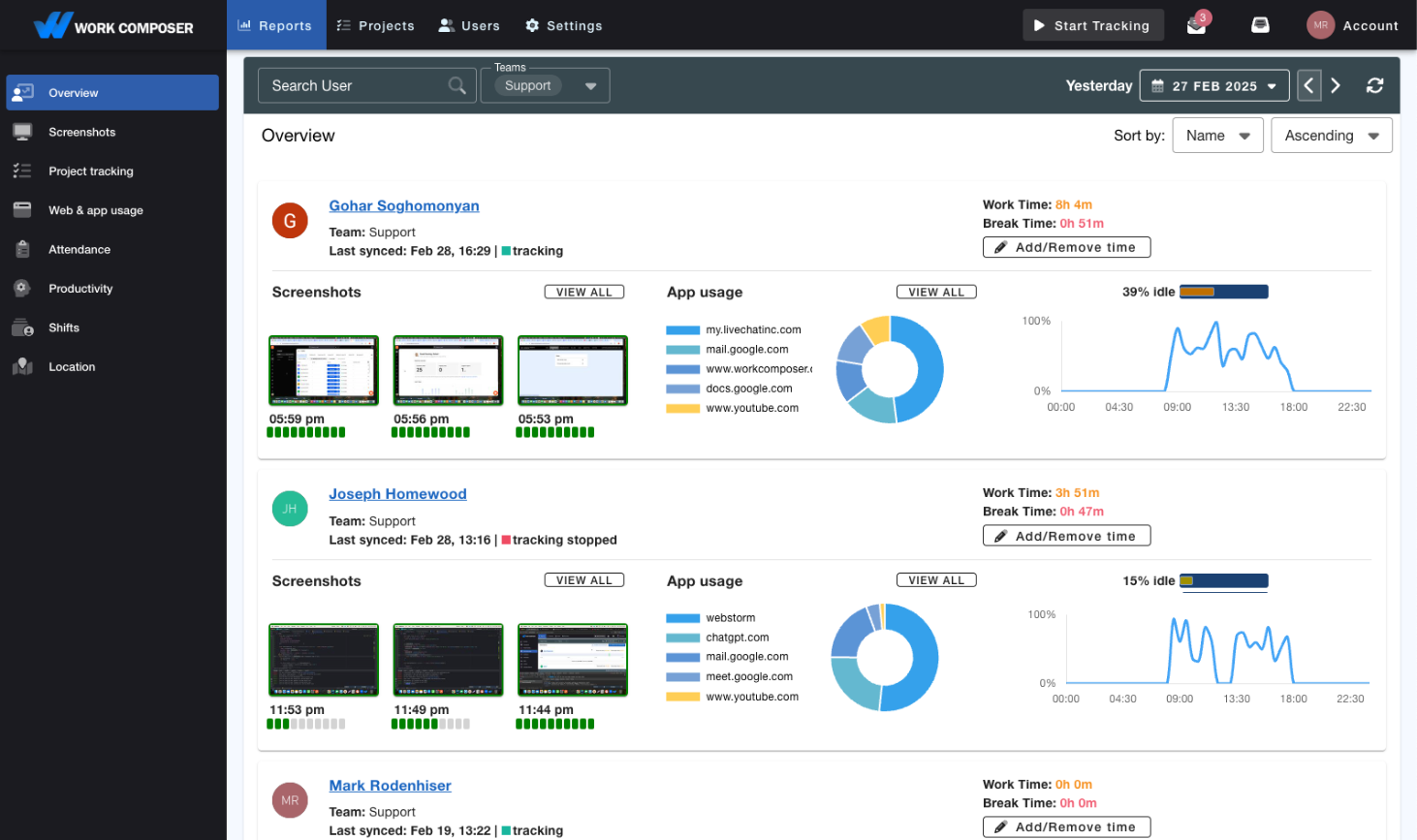
- Freelancers install the lightweight app and time is tracked automatically. Screenshots provide visual proof of work, eliminating questions about what was actually accomplished during reported hours.
- Verified Billable Hours
- Stop questioning invoices. Every hour is backed by activity data and optional screenshots showing exactly what the freelancer was working on. Pay with confidence knowing hours are accurate.
- Project-Based Time Tracking
- Track time by project, task, or client. See exactly how much time each freelancer spent on specific deliverables. Perfect for managing multiple contractors on different projects simultaneously.
- Productivity Analytics
- See which freelancers are most productive, identify who's working efficiently, and spot patterns that indicate quality issues. Make better hiring decisions based on data, not guesswork.
- Exportable Reports for Invoicing
- Generate professional reports showing time breakdowns, screenshots, and work verification. Attach to invoices or share with clients to justify payments. Streamline payment processing with transparent documentation.
- Easy Onboarding & Offboarding
- Invite freelancers by email and remove access when projects end. No long-term commitments or complicated setup. Perfect for project-based work where contractor needs change frequently.
Measurable Results
The Freelancer Management ROI
- Less Overbilling
- Activity-based time tracking curbs inflated timesheets, so you pay for work that actually happened rather than self-reported hours.
- Fewer Invoice Disputes
- Screenshots and activity logs give both sides a shared record of the work, so invoices are backed by data instead of guesswork.
- Less Admin Overhead
- Stop chasing timesheets, verifying hours, and resolving billing questions. Automatic tracking and reporting streamline freelancer management.
- Better Freelancer Relationships
- Transparency builds trust. Freelancers appreciate fair treatment and timely payment based on verified hours, leading to stronger long-term partnerships.
Real-World Scenarios
How Companies Manage Freelancers with WorkComposer
- Agencies Working With Freelance Creatives
Teams that rely on freelance designers and writers use automatic tracking with optional screenshots as proof of work, and export per-project reports to back up the hours they bill to clients.
- Teams Managing Remote Developers
Teams working with contract developers use app and URL tracking to see which tools are in use during tracked time, with idle time automatically paused so recorded hours reflect actual work.
- Teams Working With Virtual Assistants
Teams that use virtual assistants for support, data entry, and admin work track time per task and project, with app/URL activity and automatic idle pausing giving an accurate picture of where hours go.
Security & Privacy
Protect Your Business and Freelancer Privacy
Enterprise-grade security ensures both your intellectual property and freelancer privacy are protected.
- AES-256 Encryption
All screenshots and data are encrypted with military-grade AES-256 encryption at rest and in transit with TLS 1.2+. Your intellectual property is protected.
- Granular Privacy Controls
Screenshots can be blurred or disabled entirely per freelancer. Control exactly what data is captured to respect freelancer privacy while maintaining accountability.
- GDPR & CCPA Ready
Privacy controls designed to help you meet international data privacy obligations. Account data can be deleted on request, and per-freelancer screenshot and blurring settings keep data collection proportionate.
Frequently Asked Questions
- Will freelancers resist using time tracking software?
- Most freelancers actually prefer it because it protects them too. Accurate time tracking eliminates disputes and ensures they get paid fairly for all hours worked. Set expectations upfront: transparent tracking is required for all contractors.
- Can freelancers manipulate the time tracking?
- WorkComposer uses idle detection to exclude inactive time, so recorded hours reflect actual work rather than time at the desk. Optional screenshots and app/URL activity add visual context. Together these make inflated timesheets far harder to pass off, while keeping the process fair.
- What if a freelancer works for multiple clients simultaneously?
- Freelancers can switch between different client projects easily. Time is tracked to the active project only. This actually benefits everyone: you pay only for time dedicated to your work, and freelancers can accurately bill all their clients.
- How do screenshots respect freelancer privacy?
- You have full control: use blurred screenshots to verify activity without seeing details, disable screenshots entirely and rely on app/URL tracking, or use full screenshots with freelancer consent. Privacy settings can be customized per contractor.
- Can we use this for international freelancers?
- Absolutely. WorkComposer works globally and automatically handles time zones. Perfect for managing freelancers across different countries and regions. Reports show time in your timezone or theirs, as needed.
- How quickly can we onboard new freelancers?
- Send an email invitation, freelancer downloads the app, selects your project, and starts tracking. No complicated setup or training required. Remove access instantly when projects end.
- What's the cost per freelancer?
- Just $3.99 per freelancer per month with annual billing (or $4.99/month billed monthly). Most companies recover the cost within the first week by eliminating overbilling and invoice disputes. ROI is typically immediate.
Ready to transform your team's productivity?
Join teams tracking time smarter. Start your free trial today—no credit card required.
- Setup guides available
- Full access to all features
- Cancel anytime, no questions asked
- Dedicated support to get you started