Compliance & Audit Time Tracking
Keep timestamped work-hour records, verify employee hours against activity, and export the documentation you need for your compliance and audit process — with encrypted, customer-controlled storage.
The Compliance Challenge
Meeting Audit Requirements Without Manual Documentation
Regulated industries face strict requirements for documenting employee work hours, activities, and compliance with labor laws and contractual obligations.
- Manual Documentation Burden
Maintaining audit trails manually is time-consuming, error-prone, and difficult to verify. Auditors question incomplete or inconsistent records, leading to compliance risks.
- Regulatory Compliance Risks
Government contracts, labor laws, and industry regulations require detailed work verification. Failing audits can result in penalties, contract loss, and legal liability.
- Lack of Audit Trail Verification
Self-reported timesheets don't provide the verifiable proof auditors demand. You need contemporaneous documentation with timestamps and activity verification.
The Solution
Audit-Ready Documentation Automatically
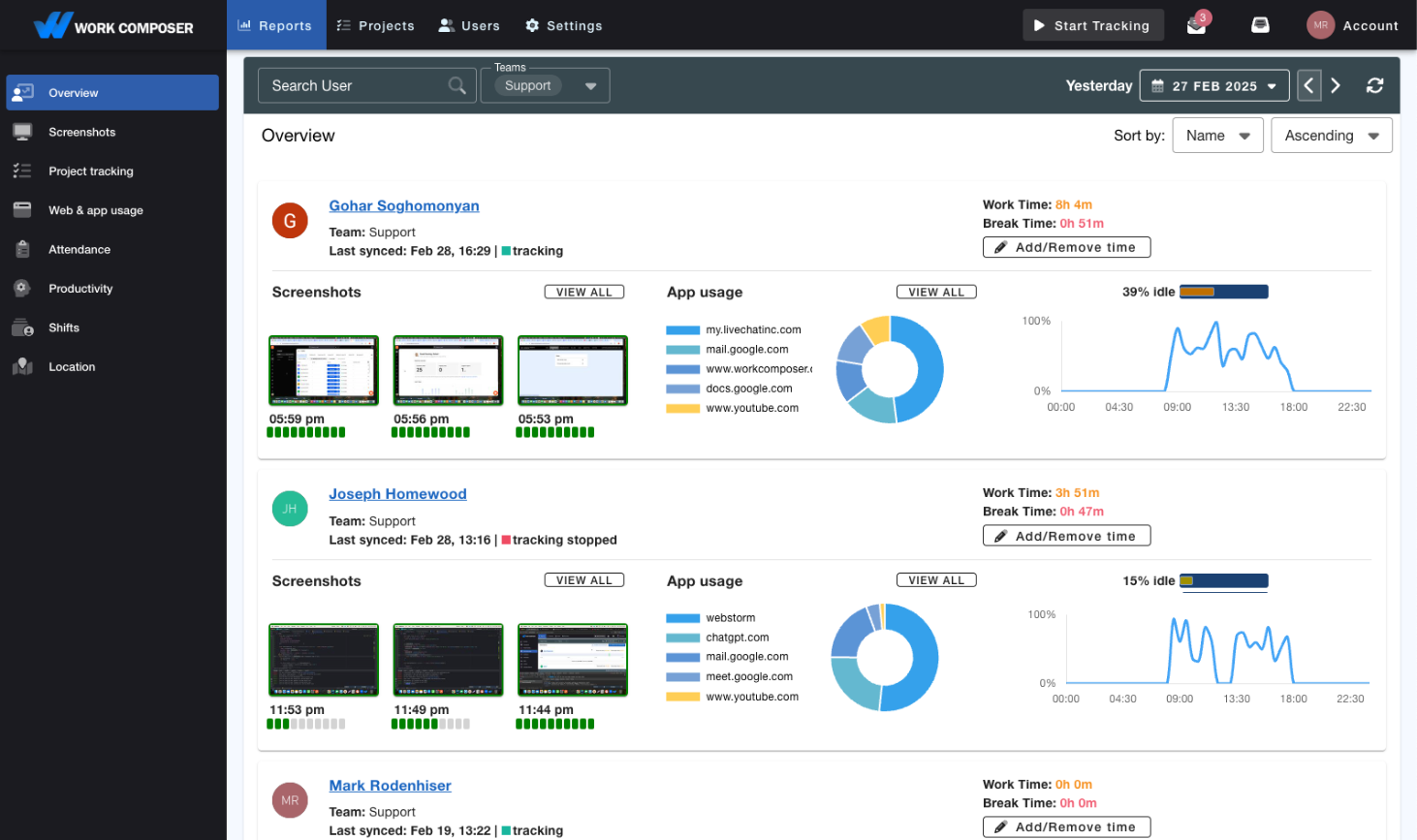
WorkComposer gives you timestamped work-hour records, an admin-action audit log, and one-click exportable reports — accurate documentation you can use in your own compliance and audit process.
- Timestamped Work-Hour Records
- Automatic, minute-precision records of who worked when and for how long, tied to app and browser-URL activity. Paired with an admin-action audit log that captures configuration changes — user, role, project, and setting edits — so administrative activity is documented without manual spreadsheets.
- Documentation for Your Compliance Process
- Produce accurate, timestamped work-hour records and activity evidence you can use when responding to audits, labor-board reviews, or contractual verification. Export the documentation in PDF or CSV; how you apply it to your specific regulatory obligations stays in your control.
- Activity-Backed Work Hours
- Back up reported hours with contemporaneous, minute-precision time records, app and browser-URL activity, and optional screenshots. Give yourself concrete evidence to reference in disputes, audits, and labor-claim reviews.
- One-Click Exportable Reports
- Generate reports showing attendance, work hours, and activity summaries. Export to PDF or CSV in one click to hand to auditors, agencies, or compliance officers.
- Encrypted, Customer-Controlled Storage
- Screenshots are encrypted with AES-256, and you can bring your own storage — point WorkComposer at your own S3 or SFTP storage so your screenshots stay under your control. Role-based access controls restrict who can view time data.
- Keep Records on Your Own Terms
- Export records and reports whenever you need them, and store your screenshots in your own S3 or SFTP storage to keep them on your infrastructure for as long as your policies require.
Frequently Asked Questions
- How does WorkComposer help with audits and reviews?
- WorkComposer produces the raw material many audits and reviews call for: timestamped work-hour records, app and browser-URL activity, optional screenshots, and an admin-action audit log of configuration changes — all exportable to PDF or CSV. Whether that documentation satisfies a specific audit standard depends on that standard and your own processes; WorkComposer supplies the evidence, not a compliance guarantee.
- How do we keep records for the long term?
- You can export time records and reports at any time and keep them wherever you need. For long-term retention of screenshots, connect your own storage (AWS S3 or SFTP) so screenshots land on infrastructure you control and retain under your own policies.
- Can auditors access records directly or do we export them?
- You export audit reports in PDF or CSV format and provide them to auditors. This maintains security while giving auditors the documentation they need. Reports include all required timestamps, activity logs, and verification data in audit-ready format.
- How does WorkComposer secure time records?
- Records are captured automatically as work happens, with minute-precision timestamps and tied-to-activity evidence rather than self-reported entries. Screenshots are encrypted with AES-256, role-based access controls limit who can view or manage data, and you can store your screenshots in your own S3 or SFTP storage. Manual-time entries and edits follow your organization's configured permissions.
- What if we're already under audit when we implement WorkComposer?
- You can implement WorkComposer mid-audit to establish accurate records going forward. While it won't retroactively create historical records, it demonstrates commitment to compliance improvement. Many organizations use implementation during audits to show proactive compliance efforts.
- Can we customize reports for specific audit requirements?
- Yes. Export data to CSV and customize as needed for specific audit formats. Our API also allows custom report generation. Most organizations find the standard audit reports sufficient, but you have full flexibility to adapt documentation for unique requirements.
Ready to transform your team's productivity?
Join teams tracking time smarter. Start your free trial today—no credit card required.
- Setup guides available
- Full access to all features
- Cancel anytime, no questions asked
- Dedicated support to get you started