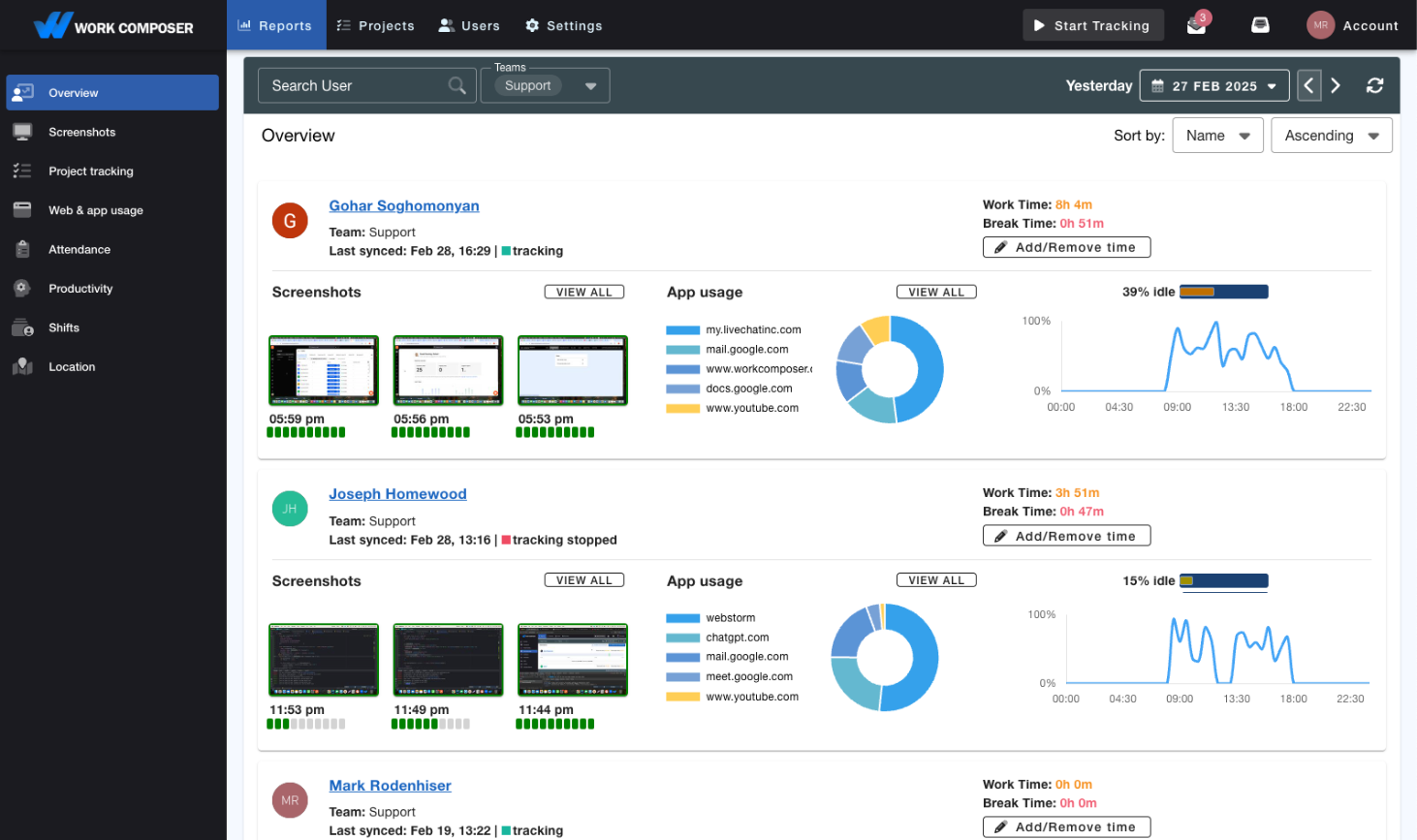
BPO & Outsourcing Time Tracking
Build client trust with transparent time tracking, verify billable hours, track attendance across time zones, and back it all with screenshot proof of work across your offshore teams.
The BPO Challenge
Client Trust Is Everything in Outsourcing
BPO and outsourcing companies face unique challenges in proving value, maintaining transparency, and ensuring quality across distributed offshore teams.
- Lack of Client Transparency
Clients can't see what their offshore team is doing, leading to trust issues and micromanagement. Without proof of work, you're constantly defending your value and justifying your pricing.
- Shift Coverage Blind Spots
Meeting client commitments means knowing your team is actually online during contracted hours. Manual attendance tracking makes it hard to confirm coverage across shifts and time zones.
- Quality Assurance Gaps
Without visibility into offshore team activities, quality issues go undetected until clients complain. You can't coach, train, or improve what you can't see or measure.
The Solution
Purpose-Built for BPO & Outsourcing Success
WorkComposer provides the transparency, accountability, and quality assurance tools BPO companies need to exceed client expectations.
- Client-Ready Transparency Reports
- Generate professional reports showing exactly what your offshore team accomplished. Include time breakdowns, screenshots, and activity summaries that clients can review anytime. Build trust with transparent proof of work.
- Attendance & Shift Coverage
- Monitor team availability and work hours with real-time attendance tracking. See who's online during contracted shifts, and use activity tracking to verify teams are working during client service hours.
- Quality Assurance Monitoring
- Screenshot monitoring provides visual verification of work quality and process compliance. See if teams are following SOPs, using the right tools, and staying focused on client work. Identify training opportunities before quality suffers.
- Accurate Billable Hours Verification
- Automatic time tracking eliminates disputes over billed hours. Clients see exactly when their dedicated team members were working, with screenshots proving active engagement. Transparent billing strengthens client relationships.
- Productivity Analytics by Client
- Track productivity metrics for each client account separately. See how time is spent per client project, compare activity across accounts, and identify process improvements across your BPO portfolio.
- Multi-Timezone Management
- Coordinate offshore teams across multiple time zones. Attendance tracking shows who's working when, making it easy to ensure coverage during client business hours regardless of location.
What You Get
Transparency Your Clients Can See
- Build Client Trust
- Transparent reporting with screenshot proof of work lets clients see what your offshore team accomplished — replacing doubt with evidence.
- Confirm Shift Coverage
- Real-time attendance and activity tracking show whether teams are online and working during contracted service hours, across every time zone.
- Spot Quality Issues Early
- Screenshot monitoring helps you see whether teams are following processes and using the right tools, so you can coach before clients notice issues.
- Back Billable Hours With Proof
- Automatic time tracking paired with screenshot proof gives clients clear evidence behind billed hours, making invoices easier to stand behind.
Real-World Scenarios
How BPO Companies Use WorkComposer
- Customer Support Outsourcing
Support BPOs use automatic time tracking with screenshot monitoring to send clients regular reports showing attendance, activity levels, and proof of work — answering questions about service quality and billed hours with evidence.
- Data Entry & Processing BPOs
Processing teams rely on attendance tracking to confirm shift coverage and activity monitoring plus screenshots to verify agents are focused on client work during contracted hours.
- IT Helpdesk Outsourcing
Helpdesk providers track time by client, project, and task and pair it with screenshot proof of work, giving clients clear documentation of the time spent supporting their accounts.
Security & Compliance
Enterprise-Grade Security for BPO Operations
Help meet strict client security requirements with AES-256 encryption of screenshots and client-controlled storage you can host in your own infrastructure.
- AES-256 Screenshot Encryption
All screenshots containing client data are automatically encrypted before storage. Meet client security requirements for handling sensitive information.
- Supports Your Privacy Obligations
Features like client-controlled storage, data-residency options, encryption, and access controls help you meet your own data-privacy obligations under regulations such as GDPR and CCPA.
- Client-Controlled Storage Options
Store screenshots in your client's AWS or on-premise infrastructure. Meet data sovereignty requirements for regulated industries.
Frequently Asked Questions
Yes! WorkComposer generates professional, client-ready reports that you can export and share. Reports include time summaries, attendance records, screenshots, and productivity metrics. Customize what clients see based on your service agreement.
WorkComposer tracks when agents are working and their activity levels, and attendance reports show whether contracted hours are being met. That gives you the visibility to confirm coverage across shifts and time zones and follow up when it's short.
Screenshot monitoring is industry standard in BPO. You can use blurred screenshots for privacy while still verifying activity. Most offshore teams understand this is required for client transparency and quality assurance. Clear communication about privacy protections (encryption, access controls) eases concerns.
Absolutely. Organize teams by client account, track time to specific client projects, and generate separate reports for each client. Perfect for BPO companies managing multiple client accounts simultaneously.
WorkComposer supports external storage in client-controlled AWS or on-premise infrastructure. Screenshots and data can be stored in specific geographic regions to meet GDPR, CCPA, or other data residency requirements.
Create a client project, invite team members via email, they download the app, and tracking begins immediately. No lengthy setup or training required.
Ready to transform your team's productivity?
Join teams tracking time smarter. Start your free trial today—no credit card required.
- Setup guides available
- Full access to all features
- Cancel anytime, no questions asked
- Dedicated support to get you started